Tampilkan postingan dengan label Tips - Trik. Tampilkan semua postingan
26 Feb 2011 | By: lilie

Highspeed.Control.Carbon.Edition 2011

High-speed control Highspeed Control Carbon Edition will take you to an unforgettable atmosphere of real racing. You will always be at the center of breakneck racing duels and fight for the victory. High-speed chase with police, as well as a large arsenal of weapons available to you so that you no prepyadstvy could at any time to pass their way to the end and win any races, regardless of their level of complexity.

Features:
* 20 different tracks
* Intuitive user interface
* Race as a felon, or police
* Extensive damage model
* Campaign for a single player and multiplayer modes
* Carbon Edition with a bonus

System requirements:

- Operating system: Microsoft Windows XP/Vista/7;
- Processor: Dual-frequency 2GHz and above;
- Memory: 600MB or higher;
- Video: 3D-graphics adapter with 128 MB of memory, compatible with DirectX ® 9.0
- Sound card: compatible with DirectX ® 9.0
- 512 MB RAM

http://fastpic.ru/view/1/2011/0227/d3ae2f05707856906da30775af6a62f4.jpg.html http://fastpic.ru/view/1/2011/0227/6dcdcf6a283eb5ab43c2c5f75adcb45a.jpg.html
http://fastpic.ru/view/1/2011/0227/3a3d41aa7becbde4eed1ad2bcc883493.jpg.html http://fastpic.ru/view/1/2011/0227/ffa3abc4ea8c13bab0d0d5f297f5adc9.jpg.html

Installation:
1. Unpack;
2. Mount image;
3. Set;
4. Play.

Year: 2011
Genre: Arcade / Race
Platform: PC
Publication Type: License
Language: German (Deutsch)
Crack: Not required (free)
Size: 572.04 Mb


Link Download:
http://letitbit.net/download/7579.b609a61f91f53344/Highspeed.2011.PC.rar.html
16 Feb 2011 | By: lilie

Tips : Internet Sharing From PC on Your Android Device Using Wifi

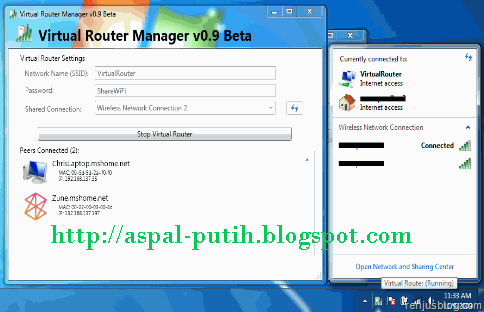
Using Wi-Fi Ad-hoc networking is the best way to share internet connection between PC and your android phone. But for that, you’ll need to root your android device and change the wifi configuration file for accessing the adhoc networks. This method varies based on the wifi chipset used in your phone. Another alternate method which can be used by almost all the android devices is by creating virtual access point’s using virtual router software. This is done using Windows 7’s wireless hosted network technology. There are currently two software's which does this job perfectly, Virtual Router and Connectify.


Download Tools Virtual Router + ConnectifityInstaller in here :
http://www.ziddu.com/download/13838602/VirtualRouterInstaller.msi.html
http://www.ziddu.com/download/13838652/ConnectifyInstaller.exe.html

If you’re using Virtual Router, be sure to check the supported wifi devices as these softwares are hardware specific.

Settings for Virtual Router [PC]
Open Virtual Router software, and fill in the settings.


Enter your preferred Network Name[SSID], password and choose the internet connection you wish to share.
Click the start button to start sharing.

In the connection status, note down the IPv4 address [for eg. 192.168.5.1] as we need it to configure the android device settings later.

Also note the DNS server being used by your internet connection. For finding DNS information, just enter ipconfig/all into the command prompt.

Mobile Wifi Settings [ANDROID]

On your android device, go to Settings> Wireless and Networks> Wifi Settings
Click the advance settings.
Select the checkbox showing “Use static IP”

Enter the IP address [for eg. 192.168.5.2]
Enter the previously noted IP address [for eg. 192.168.5.1] into Gateway field.
Enter 255.255.255.0 in Netmask field
Enter the previously noted DNS server address into DNS1 and DNS2 fields.

Now disable and enable wifi and then connect to wifi using password.
After connecting you can enjoy internet shared from PC on your android device using wifi.

Note: Wi-Fi Connections made with these software's are encrypted with WPA2 and is not possible to turn it off, so as to ensure best security for the wireless hosting network feature built into window7.
10 Feb 2011 | By: lilie

How To Hide Your WiFi Network??

Some users try to hide their WiFi network as part of their wireless security. Hiding your WiFi network effectively cuts it off from people who don’t know the SSID – or at least, that’s the theory. In truth, this technique has flaws, but it’s easy enough to execute.

quick intro:
The SSID (Service Set Identifier) of a router is the name that it broadcasts to identify itself. This is a feature you’ve already used if you have ever connected to a wireless network, and it helps users separate the many different signals riding the airwaves.

When you visit a coffee shop with free WiFi, for example, you usually know the right network to connect to because it is labeled with the shop’s name.
SSIDs are broadcasted voluntarily, however. Every router broadcasts one by default, but the option can be turned off. When you turn off SSID broadcast, others won’t be able to pick up the broadcast of your wireless network and they won’t know to whom the network belongs to.

The limit to hide:
At least, that’s the theory. The problem with SSID hiding is that hiding wireless signals is impossible. SSID or not, your router is still broadcasting radio waves in all directions, which means that those waves can be intercepted. They won’t have an SSID attached to them, but there are other ways to separate wireless networks.
This means that hiding your SSID won’t hide your wi-fi network from someone using a WiFi network scanner.  Anyone who is going to try and crack a wireless network will be using one of those anyway, so the utility of hiding an SSID is fairly limited.

                                                                   This to Hiding

If you’re still interested in hiding your SSID, I have good news – the process of doing so is quite simple.
First, you’ll need to log onto your router. This is done by entering the local IP address of your router into your web browser – in most cases, this is 192.168.0.1. You’ll be presented with a login page prompting you with a username and password. Hopefully you will have customized this, but if not, refer to your router’s manual for the default information.
Once you’re in, navigate to your router’s wireless settings page, find the SSID broadcast option (usually a checkbox) and uncheck it. Then, save your new settings. It’s that easy. Just make sure you know your SSID, because you’ll need to have that information if you want to connect – if you’re not using a WiFi sniffer, at least.

I’ve already said that hiding your SSID isn’t really a method of improving your security, but I want to stress that point. Many people want to know how to hide their SSID, and I can only assume they would want to do so under the assumption that it will make them more secure.
Wireless just doesn’t work that way. The only protection this offers is against an uninformed user who is trying to find a specific network, perhaps as a means of identifying where a person lives, or trying to guess the network’s password (you do have a secure password, right?).

enjoy.
24 Jan 2011 | By: lilie

Cara Memperbaiki Flashdisk


Pesan error " usb device not regodnized " ketika usb flashdisk kita colokin di usb port laptop atau desktop PC..seolah olah perangkat usb rusak.padahal banyak data penting yang disimpan pada flashdisk kita..walaupun harga usb flashdisk murah bisa beli baru tapi data yang terlanjur di simpan disitu banyak dan penting banget.


Kesalahan ini adalah umum untuk semua perangkat USB yang digunakan tidak hanya USB flash disk. perangkat USB ketika dicolokkan ke dalam sistem operasi komputer akan melaporkan:
Mungkin ketika kita ditancapkan atau terkena kebocoran awal yang buruk pada kontroler usb ic (kadang-kadang melalui resistor, atau kapasitor) lihat skema dibawah:

Tips coba lakukan step berikut.

- Coba cek jalur Resistor atau capasitor jika menggunakan kapasitor biasa kebocoran sering   terjadi disitu, ukur keduanya, jika bagus lanjutkan step selanjutnya

- Tegangan drop dari 3v3 menjadi 2V pada zener diode,cari spare part tersebut yang berwarna     merah ada  pelet hitam..ukur tegangan harus 3v3 atau 3,3volt.jika bagus ke step selanjutnya.

- Cek cristal osilator 12Mhz warnanya silver atau seperti logam.
 cara ukurnya biasa, gunakan ohm meter atau multi tester pada stelan 10x.
 jika tidak drop atau jarum multi tak terhingga berarti bagus cristal 12 mhz nya.

- Controller IC error, nih bagian rada ribet mesti punya air solder atau solder uap ( Blower     solder) yang   biasa dipake teknisi hand phone, panasi bagian IC data dengan suhu sedang.

- Jika Anda telah memeriksa langkah-langkah tersebut biasanya berhasil.
 tapi jika tetep gagal, apa boleh buat flash disk anda memang bener bener rusak.

semoga bermanfaat.
22 Jan 2011 | By: lilie

CARA MUDAH BUAT USB BOOTABLE PADA FLASHDISK


Wintoflash utility paling mudah dan simple untuk membuat USB Bootable pada Pendrive atau Usb Flashdisk.
dengan tool ini kita bisa dengan mudah membuat flashdisk memory stik sebagi usb instalasi program atau operating system windowsXp atau Windows Vista cukup mudah intstalasinya. Intall program lalu ikuti langkah dibawah ini mudah kok.

setelah selesai nanti seperti ini:

 langkah selanjutnya seperti ini lalu pilih next kemudian cari folder source cd/dvd drive master windows asli
atau folder tempat kamu nyimpen master system windowsXp atau windos Vista.


Klik Next tunggu   selesai ( finish ) ..siap digunakan.
jangan lupa ubah setting boot pada pc desktop atau netbook/notebook atau laptop kamu pada opsi boot with usb removable device..dan jangan dicabut sampai intalasi selesai..sebaikny nyopot usb drivenya setelah shutdown.

Cat: jangan tambah file apapun dalam usb bootable yang sudaj jadi dan siap intall program windows tadi karena kebanyakan kasus file cacat dan mesti buat ulang lagi..repooot.
4 Jan 2011 | By: lilie

Cheat Point Blank Update 5 Januari 2011

* Jalankan rcmp.exe, kemudian jalankan juga Point Blank-nya seperti biasa.
* Setelah itu, tekan F10 pada saat sebelum rede.
* Secara otomatis EXP Anda akan bertambah menjadi 50.000++
* Jangan lewatkan kesempatan ini, segera beli senjata Kris dengan point yang telah Anda dapatkan.
* Buat room baru, tetapi Anda harus menjadi room master atau RM.
* Mainlah seperti biasa, pada saat permainan sedang berlangsung tekan tombol F1, ini berguna untuk          membekukan musuh, sehingga kita bisa dengan mudah menembakinya.


 Donload link:
http://www.ziddu.com/download/13266715/RINOCOMP2.9.rar.html
3 Jan 2011 | By: lilie

Cara Ganti Background FACEBOOK


Bosen dengan tampilan standar desktop bawan facebook.
masuk dulu ke alamat ini
- http://www.pagarage.com


- Klik Install pulg in
- Download file Yontooclientsetup.exe
- double klik pada file yontooclientsetup.exe
- ikuti instruksi sampai selesai.
- Restart browser kamu.
- masuk lagi ke alamat link diatas :
   http://www.pagarage.com- Pilih Layout kesukaan kamu..lalu select..nanti keluar tulisan success.

- login ke www.facebook.com kamu lihat hasilnya.

Selamat mencoba.